Chapter 2
Displaying with the 5×5 LED Matrix
การแสดงผลด้วย LED 5x5
- The 5 × 5 LED matrix (จอแสดงผล LED 5x5 จุด) is the micro:bit's screen: 25 red LEDs.
- It can scroll words, show numbers, show 40 ready-made icons, show pictures you draw, and play animations.
2.1.1 Displaying Text & Numbers การแสดงตัวอักษรและตัวเลขบน LED 5x5
- One block from the
Basicgroup is enough to put words or numbers on the screen. - A word is too wide for 5 columns, so the micro:bit scrolls it from right to left.
Step-by-step: scroll some text
- Step 1 — Drag the block: take
show string "Hello!"fromBasicand drop it insideforever. Change the text if you like. - Step 2 — Watch the simulator: "Hello!" slides to the left, over and over.
- Step 3 — Download: flash it to the board and the real LEDs do the same.
on start or forever?
💡 Remember
show stringinside on start → the message scrolls once.- Inside forever → it scrolls without stopping.
- Put one-time jobs (a welcome sound, setting up) in
on start; it always runs beforeforever.
Showing numbers with show number
- One digit (0–9): shown in the middle, no scrolling.
- Two or more digits, or a minus sign (e.g. 255, -42): scrolls right to left.
💻 2.1.1 Text and numbers — on start runs once, forever repeats
on start
show string START
show number 3
show number 2
show number 1
forever
show number 0
See it in JavaScript
basic.showString("START")
basic.showNumber(3)
basic.showNumber(2)
basic.showNumber(1)
basic.forever(function () {
	basic.showNumber(0)
})2.1.2 Displaying Graphics on 5x5 LED Matrix การแสดงกราฟิกบน LED 5x5 จุด
- MakeCode has 40 ready-made icons.
- If none fits, draw your own picture LED by LED.
Part 1: Preset icons การแสดงไอคอน
- Step 1 — Open Basic: click the
Basicgroup in the block palette. - Step 2 — Place show icon: drag
show iconinsideforever. - Step 3 — Pick the picture: click the block's dropdown and choose one of the 40 icons.
💻 2.1.2 Preset icons — one block, 40 pictures
forever
show icon
pause (ms) 500
show icon
pause (ms) 500
show icon
pause (ms) 500
clear screen
pause (ms) 500
See it in JavaScript
basic.forever(function () {
	basic.showIcon(IconNames.Heart)
	basic.pause(500)
	basic.showIcon(IconNames.Happy)
	basic.pause(500)
	basic.showIcon(IconNames.Yes)
	basic.pause(500)
	basic.clearScreen()
	basic.pause(500)
})
All 40 icons, exactly as the LEDs show them ไอคอนสำเร็จรูป 40 แบบ
The name under each picture is the one in the show icon dropdown.
Part 2: Draw your own picture การสร้างกราฟิกด้วยตนเอง
- Step 1 — Place show leds: put
show ledsinsideforever. - Step 2 — Click the squares: a click switches that LED on; another click switches it off.
- Step 3 — Watch the simulator: it redraws your picture the moment you change a square.
💻 2.1.2 Draw your own — show leds, pixel by pixel
forever
show leds
pause (ms) 600
show leds
pause (ms) 600
See it in JavaScript
basic.forever(function () {
	basic.showLeds(`
		# . . . #
		. # . # .
		. . # . .
		. # . # .
		# . . . #
		`)
	basic.pause(600)
	basic.showLeds(`
		. . # . .
		. # # # .
		# # # # #
		. # # # .
		. . # . .
		`)
	basic.pause(600)
})2.2 Animated Graphics การสร้างกราฟิกแบบเคลื่อนไหว
An animation needs only two things:
- At least two different pictures (frames).
- A short pause between them, so your eye sees movement.
Step-by-step: the running stickman ขั้นตอนการสร้าง
- Step 1 — Place show leds: put
show ledsinsideforever. - Step 2 — Draw frame 1: light the first running pose (left picture below).
- Step 3 — Add a pause: snap
pause (ms) 100underneath.show ledsalready holds the frame for 400 ms; the pause adds 100 ms more. - Step 4 — Duplicate: right-click
show leds→ Duplicate. Thepauseunder it is copied too. - Step 5 — Change frame 2: snap the copy on the end and redraw it as the second pose (right picture).
⏱️ show leds waits too
- On a real board
show ledskeeps its picture for 400 ms before the next block runs. - So a frame stays on screen for 400 ms + the pause.
show iconwaits 600 ms in the same way.
Try it: change the pause and work out each frame's time.
- Step 1 — pause 500: 400 + 500 = 900 ms per frame. The stickman walks slowly.
- Step 2 — pause 0: 400 + 0 = 400 ms per frame. Still easy to see, because
show ledswaits on its own.
Full MakeCode program
💻 2.2 Animation — frames and pause make him run
forever
show leds
pause (ms) 100
show leds
pause (ms) 100
See it in JavaScript
basic.forever(function () {
	basic.showLeds(`
		. . # . .
		. # # # .
		. . # . .
		. # . # .
		# . . . #
		`)
	basic.pause(100)
	basic.showLeds(`
		. . # . .
		. . # . .
		. # # # .
		. . # . .
		. # . # .
		`)
	basic.pause(100)
})Interactive Display Hardware Explorer
Hover over or tap a part of the real micro:bit V2 photo to learn what it does.
micro:bit V2 5×5 LED Matrix & Front Controls
Interactive Map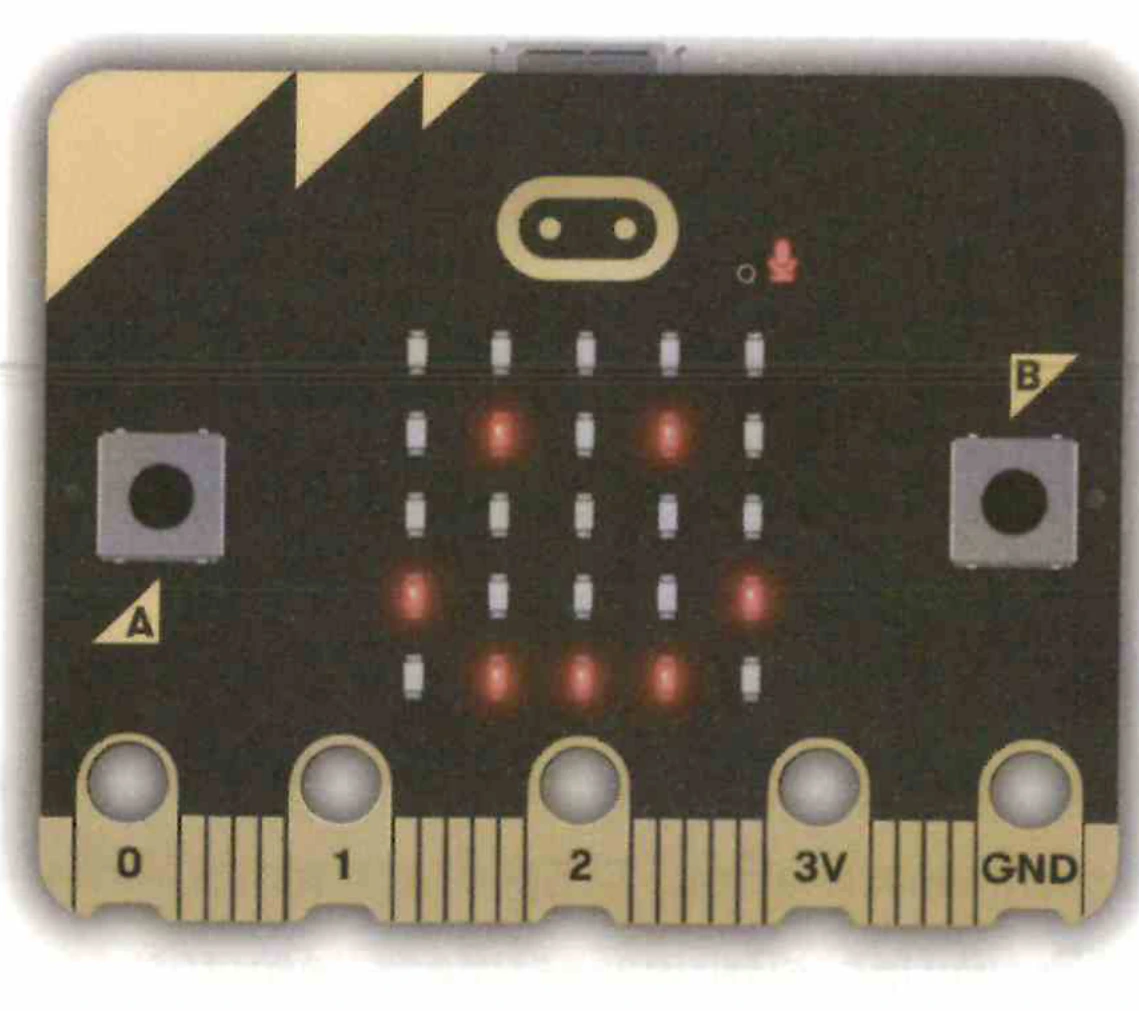
Hover or tap the 5x5 LED Matrix, Pixel (0,0), Logo, Button A, Button B, or Edge Connector to explore.
Chapter 2 Review & Self-Check
Check what you know about scrolling text, the 40 icons, LED coordinates and frame animation.